
Microsoft announced a major upgrade to Copilot: it will integrate Word, Excel, and PowerPoint directly into this AI assistant, while also adding the programming tool Code and the continuously running AI agent Autopilot, aiming to transform Copilot from a standalone AI assistant into a one-stop work portal covering office tasks, programming, and task execution.
Microsoft is further expanding Copilot's product boundaries.
Friday, micro$Microsoft (MSFT.US)$Microsoft announced a host of new features for Copilot, integrating Word, Excel, and PowerPoint directly into the AI assistant, while also introducing the coding tool Code and the continuously running AI agent Autopilot. The company aims to transform Copilot from a standalone AI assistant into a one-stop workspace hub that spans productivity, programming, and task execution.
 Microsoft hopes to expand the scope of Copilot's usage with this product upgrade and to compete with AI products such as ChatGPT and Claude. With Office's core applications now integrated into Copilot, Microsoft is striving to enable users to accomplish more tasks within the AI assistant itself, without having to frequently switch between different apps.
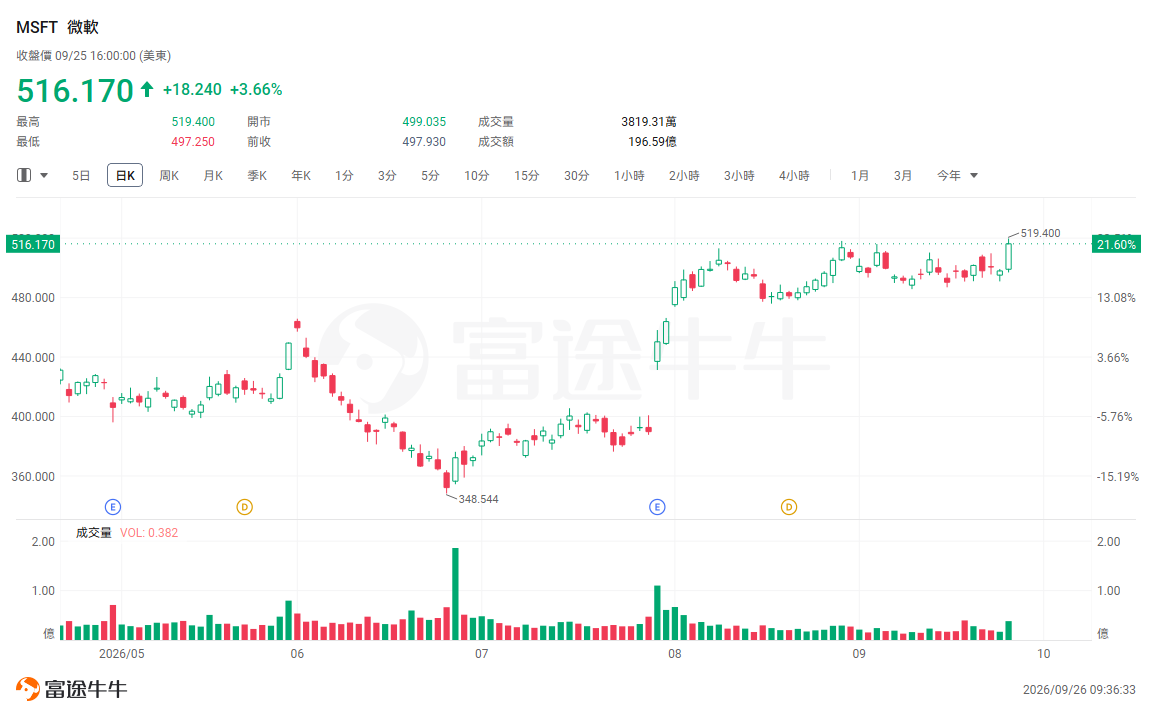
In response to the news, Microsoft closed up 3.66% on Friday.
The Office suite seamlessly integrates with Copilot.
One of the most closely watched changes in this upgrade is the direct integration of Word, Excel, and PowerPoint into Copilot.
Microsoft stated that users can create and edit Word, Excel, and PowerPoint files in Copilot and continue collaborating with other users. The relevant files can remain synchronized with the original Office applications.
This means that Copilot is no longer just an AI feature within Office applications; it is becoming a unified entry point for users to access these productivity tools. Users can engage in conversations, work with files, and complete office tasks—all within the same environment.
Microsoft has also upgraded Copilot's Home feature, integrating Chat and Copilot Cowork and adding Office capabilities.
Copilot adds new programming tools and AI agents.
In addition to Office integration, Microsoft has also added two new AI capabilities to Copilot this time.
Among them, Code employs the same technology as GitHub Copilot, enabling users to create applications, dashboards, and other software via natural language—without having to write code directly.
Another feature, Autopilot, places greater emphasis on task execution.
Autopilot is an upgraded version of Microsoft's previously launched Scout AI agent, designed to function as a continuously running digital collaborator. It can keep executing tasks even when the user is not at their computer.
Microsoft stated that Autopilot will be expanded to a private preview by the end of September.
Unlike traditional chat-based AIs, the core change in Autopilot is a shift from "answering questions" to "performing tasks." Microsoft has also assigned it a separate identity and access controls to meet the needs of enterprise environments.
From an AI assistant to a work portal
The core of this upgrade is not merely adding a few features, but rather Microsoft is redefining Copilot's role within the office software ecosystem.
Previously, AI appeared primarily as an accessibility feature within Office, allowing users to leverage Copilot to generate text, analyze data, or create presentations. This time, Microsoft has integrated Word, Excel, and PowerPoint directly into Copilot, turning Copilot itself into the product's entry point for these tasks.
Meanwhile, Code integrates software development capabilities into a single platform, while Autopilot handles the continuous execution of tasks.
Under this product architecture, users can perform a full range of tasks in Copilot, from articulating their needs and generating content to executing actions.